

How to reduce ACoS on eCommerce marketplaces: cut spend on search terms that don’t convert, move proven keywords into exact-match campaigns with their own bids, set bids from each product’s margin and fix the listings that convert poorly. ACoS rarely comes down by cutting budget across the board. It comes down by taking money away from waste and giving it to what already works. Here’s how to lower ACoS on eCommerce marketplaces with the process we use on client accounts.
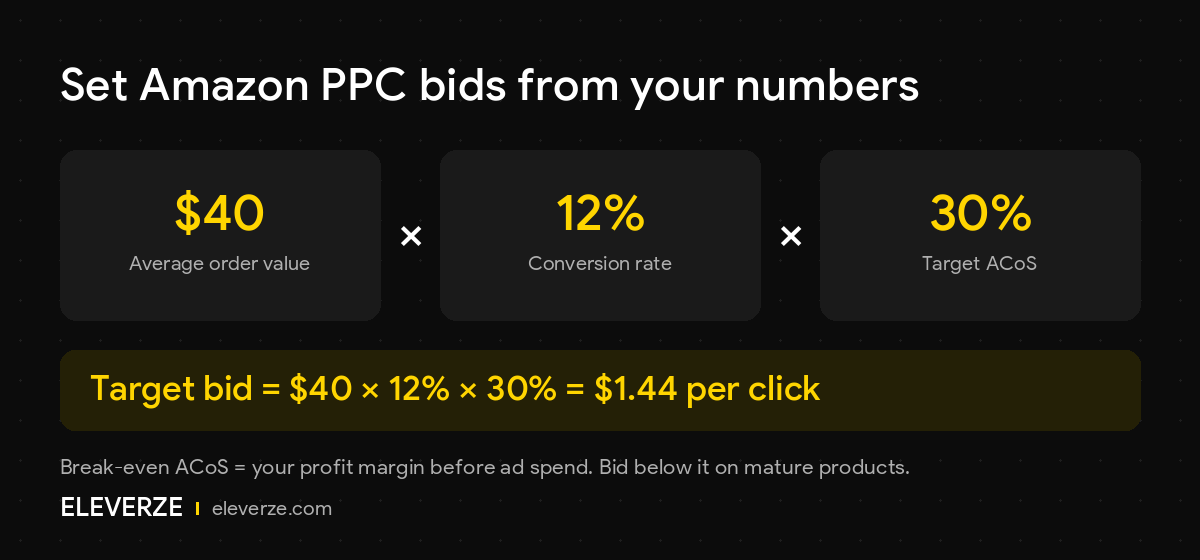
Table of Contents
First, know your break-even ACoS
Your break-even ACoS is your profit margin before ad spend. If a product sells for $40 and costs $24 to make, ship and sell (including eCommerce fees), your margin is $16, or 40%. At 40% ACoS you break even on ad sales; below it you profit. Calculate this per product, because a single account-wide ACoS target will overspend on low-margin products and underspend on high-margin ones. eCommerce Ads explains the metric itself in its guide to ACoS; knowing your break-even is the first step in how to reduce ACoS profitably.
Why ACoS creeps up
- Auto and broad campaigns spending on irrelevant searches
- The same keyword targeted in several campaigns, bidding against itself
- Bids set once and never adjusted as cost per click rises
- New competitors entering your keywords
- A listing whose conversion rate has dropped (lost reviews, price change, suppressed images)
Step 1: Cut wasted spend from the search term report
Download the search term report for the last 30–60 days. Sort by spend. Any search term with meaningful spend and no sales, or with ACoS far above your break-even, is a candidate for a negative keyword. Use negative exact for specific bad terms and negative phrase for whole families of irrelevant searches. Repeat weekly.
Step 2: Harvest winning search terms into exact match
Search terms that convert well in auto or broad campaigns should get their own exact-match targets in a manual campaign, with a bid you control. Then add them as negative exact in the source campaign, so the two don’t compete. This single habit does more for ACoS than almost anything else, and it’s the core of how to reduce ACoS week after week.
Step 3: Set bids from margin, not from the marketplace's suggestion
A simple starting point: target bid = average order value × conversion rate × target ACoS. For a $40 product converting at 12% with a 30% target ACoS, that’s $40 × 0.12 × 0.30 = $1.44. Lower bids on keywords running above target, raise them where you’re profitable and losing impressions. Why your actual cost per click often sits below your bid is covered in our eCommerce PPC guide.
Step 4: Adjust placements
Check the placement report. Top of search often converts best and can justify a placement increase; product-page placements are frequently the least efficient. Shift spend toward placements that convert for each campaign. Placement shifts are an underused answer to how to lower ACoS on eCommerce marketplaces.
Step 5: Fix the listing
If a product’s conversion rate is weak, every click costs more than it should. Improve the main image, title, price position and bullets before you raise bids. Our listing optimization guide covers what to change. Fixing conversion is often a cheaper answer to how to reduce ACoS than any bid change.
Step 6: Restructure campaigns by purpose
Separate campaigns by job: research (auto and broad), ranking (exact on keywords you want to own), profit (exact on proven converters) and brand defense (your own brand terms). Each gets its own budget and ACoS target, so a launch push doesn’t hide waste elsewhere. This is how to reduce ACoS without starving the campaigns that build rank.
Watch TACoS, not just ACoS
TACoS is ad spend divided by total sales, including organic. You can push ACoS down by bidding only on your own brand name, but total sales stall. Healthy advertising shows falling TACoS: ads drive rank, rank drives organic sales, and the ad share of revenue shrinks over time. Anyone working out how to lower ACoS on eCommerce marketplaces should track TACoS alongside it.
Common mistakes when trying to reduce ACoS
- Cutting all bids by the same percentage
- Pausing campaigns during a launch because ACoS is high
- Judging keywords on too few clicks
- Ignoring seasonality: cost per click rises in Q4 and around Prime Day
- Never checking whether a high-ACoS keyword is lifting organic rank
How to reduce ACoS: FAQ
What is a good ACoS on eCommerce marketplaces?
There’s no single number. A good ACoS is one below your break-even for profit campaigns, and one you’ve chosen deliberately for launch and ranking campaigns.
How fast can I reduce ACoS?
Cutting wasted spend can lower ACoS within a few weeks. Gains from restructuring and listing work build over one to three months.
Does lowering bids always lower ACoS?
Not always. Lower bids can drop you to placements that convert worse, so ACoS may not improve while sales fall.
Should I turn off auto campaigns?
Usually not. Switching them off is rarely how to reduce ACoS; keep them on a lower budget as a research tool and harvest what they find.
Want a second pair of eyes on your ad account? Eleverze’s eCommerce PPC team starts every engagement with a free audit.




One thought on “How to Reduce ACoS on eCommerce marketplaces: 6 Steps That Work”
Comments are closed.